Strawberry Daily Planner Template for Organized Days
A planner should feel personal, not just functional. The Strawberry Daily Planner Template offers a fresh approach to organizing your day with a design that feels inviting rather than clinical. Whether you are mapping out work tasks, tracking personal goals, or simply trying to bring more structure to your morning routine, this template provides a flexible foundation that adapts to how you actually live and work.
What Makes This Planner Different
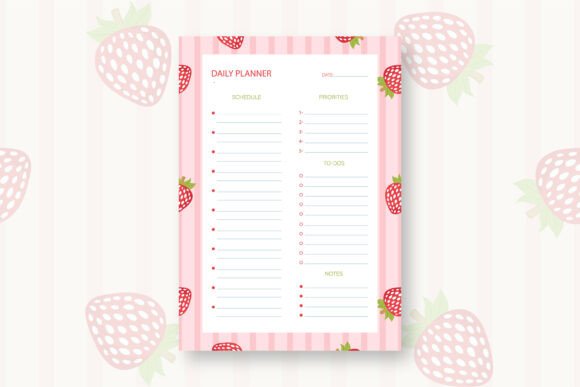
At its core, this template gives you a structured layout for planning a single day. But unlike generic planners that can feel cold or overly corporate, the Strawberry Daily Planner Template brings a playful, hand-drawn aesthetic to the page. The design was created in Adobe Illustrator without any AI assistance, which means every curve and detail was intentionally placed by a designer. This human touch matters if you value authenticity in the tools you use.
The template arrives in three file formats: an editable EPS file, a standard PDF, and a JPG image. All files are A4 sized at 300 DPI resolution, so prints come out crisp and clean. Because everything is packaged in a single ZIP folder, you simply extract the files using free software like 7zip or WinRAR, and you are ready to go.
Who Benefits from This Template
Busy adults between their twenties and fifties often juggle multiple responsibilities. You might be a freelancer managing client deadlines, a parent coordinating family schedules, or a small business owner tracking daily operations. The Strawberry Daily Planner Template works well for anyone who wants to bring intention to their day without feeling overwhelmed by complex planning systems.
Beginners will appreciate that the layout is straightforward. There is no steep learning curve, no complicated symbols to decode. You simply open the file, print it, or edit it digitally, and start planning. For creators and hobbyists, the hand-drawn style adds a layer of charm that makes planning feel more like a creative act than a chore.
Practical Uses in Everyday Life
Imagine starting your morning with a printed planner page. You jot down your top three priorities for the day, note any appointments, and leave space for spontaneous tasks. The template gives you room to write without feeling cramped, and the A4 size means you can spread out your thoughts comfortably.
In a professional setting, you might use the editable EPS file to customize the template before printing. Add your logo, adjust the color scheme, or include specific sections that match your workflow. Small business owners can print multiple copies for team members who prefer paper planning over digital tools.
Educators and bloggers often need content that feels approachable. This template can be used to create printable resources for students or followers. Because the design is print-ready and high resolution, you can produce clean copies without worrying about pixelation or poor quality.
Getting Started with Digital or Print Use
If you prefer digital planning, open the PDF or JPG in your preferred note-taking app. Many people use tablets with stylus pens to write directly on the digital page. The 300 DPI resolution ensures that even when you zoom in, the text and graphics remain sharp.
For those who love the feel of pen on paper, print the PDF on your home printer or at a local print shop. The A4 size is standard and fits easily into binders or clipboards. You can print a fresh page each day or print a stack for the week ahead.
Key Features Worth Noting
- Hand-drawn design created manually in Adobe Illustrator, not generated by AI
- Three file formats included: EPS, PDF, and JPG for flexibility
- A4 size at 300 DPI ensures professional print quality
- Editable EPS file lets you customize colors, text, and layout
- Print-ready straight out of the ZIP folder
- Compatible with any compression software like 7zip, WinRAR, or built-in OS tools
What to Consider Before Using This Template
The Strawberry Daily Planner Template is designed for single-day planning. If you need a weekly or monthly overview, you might want to print multiple pages and bind them yourself. Some users create their own planner by printing a month of daily pages and hole-punching them into a binder.
Because the template comes as a ZIP file, you will need basic familiarity with extracting compressed folders. This is a simple step on most computers. On Windows, you can right-click and select Extract All. On macOS, double-clicking the ZIP file usually extracts it automatically. If you run into trouble, free software like 7zip handles most formats reliably.
The editable EPS file requires vector editing software such as Adobe Illustrator or a free alternative like Inkscape to make changes. If you only need the design as-is, the PDF and JPG files are ready to use immediately.
Making It Your Own
One of the strongest appeals of this template is the ability to personalize it. Open the EPS file and adjust the strawberry motif, change the header font, or add your own sections. Perhaps you want a box for habit tracking, a space for gratitude notes, or a section for meal planning. The editable format puts that control in your hands.
For entrepreneurs and content creators, this customization opens up possibilities. You can rebrand the template with your own colors and offer it to your audience as a free download or bonus. Because the original design is hand-drawn, it carries an artisanal quality that many people find more appealing than mass-produced templates.
Why Hand-Drawn Design Matters
In a world where AI-generated content is becoming common, there is growing appreciation for human-made design. This template was drawn by hand using a stylus and tablet in Adobe Illustrator. Every stroke was intentional. That care translates into a warmer, more organic look that feels less like a factory product and more like something made for you.
People often describe hand-drawn planners as more calming to use. The slight imperfections and natural curves of hand-drawn lines create a visual environment that feels less sterile than purely digital designs. If you have ever found yourself turned off by robotic-looking templates, this organic style might be exactly what you need.
Storage and Organization Tips
Once you have your printed pages, consider keeping them in a dedicated folder or binder. Some users prefer to date each page and file them chronologically, creating a journal-like record of their days. Over time, this collection becomes a resource for reviewing patterns in productivity, mood, or habits.
If you go fully digital, organize your JPG or PDF files in folders by month or week. Many note-taking apps allow you to import images and write over them, which combines the charm of a hand-drawn layout with the convenience of digital search and backup.
Final Thoughts on Adding This to Your Routine
The Strawberry Daily Planner Template is a simple tool that does one thing well: it gives you a pleasant, human-centered space to plan your day. It does not promise to fix your productivity overnight or replace complex project management systems. What it does offer is a small moment of calm in your morning routine. A place to write down what matters, with a design that makes you want to keep coming back.
Whether you print it fresh each day or keep a digital copy on your tablet, the template meets you where you are. No learning curve, no unnecessary complexity. Just a thoughtfully designed page waiting for your plans.