Personal Growth Goal Planner Canva
Staying intentional about personal development requires more than good intentions. It demands a system that captures your vision, breaks it into actionable steps, and keeps you accountable over time. The Personal Growth Goal Planner Canva offers exactly that—a complete, editable toolkit designed to help you organize goals, build habits, and track progress across every area of life. Whether you are an entrepreneur mapping quarterly targets, a student setting academic milestones, or a creative exploring new projects, this planner bridges the gap between aspiration and daily action.
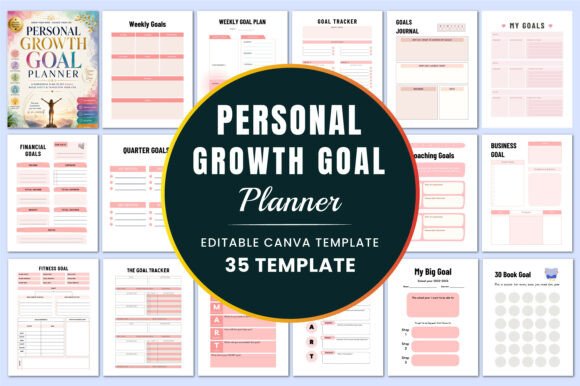
What makes this planner particularly useful is its flexibility. With 35 editable Canva templates, you can customize each page to fit your unique rhythm. The set includes everything from a dedicated goal tracker and weekly goal plan to financial goals, a vision board, and even a 30-book goal log. The availability of PDF, JPG, and PNG files at 300 DPI with CMYK color ensures professional-quality printing or digital use. No bleed and standard 8.5 x 11-inch dimensions make it straightforward to bind or insert into a binder. This article explores how you can use each component to design a self-improvement practice that actually sticks.
Building a Goal System That Actually Works
The core of any personal growth practice is a reliable method for setting and reviewing goals. This planner provides multiple layers of goal tracking so you can zoom in and out as needed. The My Goals and Reach Your Goals pages are ideal for capturing your long-term vision. Start by writing down what truly matters to you—whether that is launching a side business, improving your health, or deepening a skill. Then use the Goal Action Plan to break that vision into specific steps. Instead of a vague intention like “get fit,” you define what success looks like, what resources you need, and what your first action will be.
The Weekly Goals and Weekly Goal Plan templates bring that big picture into the present. Every Sunday evening, take ten minutes to list three to five priorities for the coming week. Pair each goal with a measurable outcome. For example, instead of “work on website,” write “publish two blog posts and update the homepage copy.” The Monthly Goals and Quarter Goals pages then help you review your momentum. If you notice that a quarterly goal is falling behind, you can adjust your weekly tactics before the quarter ends. This layered approach prevents the common trap of setting ambitious annual goals and forgetting about them by February.
The SMART Goals Planner for Students and Student Goal Setting pages add structure for academic contexts. If you are a student or educator, these templates guide you through the Specific, Measurable, Achievable, Relevant, and Time-bound framework. A typical entry might be: “Complete the first three chapters of the textbook by Friday, with a quiz score of at least 85 percent.” The My SMART Goal page works just as well for professionals—use it to clarify project deliverables or certification milestones.
From Vision Boards to Daily Routines
Goal setting becomes more powerful when you connect it to daily habits and visual motivation. The Vision Board template is one of the most creative pages in the set. You can use images, words, or color palettes that represent your desired future. For a designer or marketer, this might mean creating a mood board for a brand you want to build. For a freelancer, it could be a collage of travel destinations, income milestones, or workspace aesthetics. Printing or saving this page where you see it daily reinforces your why.
The Daily Routine template brings that vision down to ground level. Effective routines are not about packing every hour with tasks—they are about protecting time for your priorities. For example, if one of your goals is to write a book, block out 45 minutes each morning for drafting. Use the Self-Care Goals page to ensure you are also scheduling rest, exercise, and connection. Many people overlook self-care in pursuit of productivity, yet consistent energy depends on it. The 30 Book Goal template is a great companion for anyone pursuing a reading habit. Track titles, start dates, and completion dates. Pair it with a note on what you learned from each book to turn passive reading into active growth.
The Goal Tracker and The Goal Tracker pages provide a visual snapshot of your progress. You can use them for habit streaks, project milestones, or financial savings. Instead of a generic checkmark system, consider using a color code: green for completed, yellow for in progress, and red for stalled. This quick visual scan helps you spot areas that need more attention without reading through notes. The Habits Goal and related pages (like Weekly Meal Goal) allow you to track specific behaviors that support your larger objectives. For instance, if your annual goal is to run a 10K, your weekly meal goal might focus on protein intake and hydration.
Financial and Business Goal Planning
Financial goals often feel abstract until you break them into actionable sheets. The planner includes Savings Goal, Financial Goal, Financial Goals (multiple versions), Income Goals, and Business Goal templates. This is valuable for anyone managing personal finances or running a small business. For a freelancer, the Income Goals page can track monthly revenue targets, while the Savings Goal page tracks a specific fund—like a tax buffer or equipment upgrade. For a small business owner, the Business Goal template helps define objectives such as increasing email subscribers by 20 percent or launching a new product line.
The Financial Goals page encourages you to set both short-term and long-term targets. A practical example: “Save $500 for an emergency fund by June” and “Invest 10 percent of monthly income into a retirement account.” The Goal Action Plan can then outline the exact steps—such as automating a weekly transfer of $50 to a savings account. For entrepreneurs, the Coaching Goals page is useful if you are working with a mentor or coach. It structures your sessions around clear outcomes, making each conversation more productive.
Using the Set Up Your Goals page at the start of any financial initiative helps you identify your baseline. Where are you now? What resources do you already have? What is the first step? This grounded approach prevents overly optimistic planning that does not align with your current reality. The Goal Worksheet is another great tool for brainstorming and clarifying financial objectives before committing them to a formal tracker.
Adapting the Planner for Students and Creatives
The planner’s design serves a wide audience, but students and creative professionals will find specific pages especially useful. For students, the My Learning Goals and My Big Goal templates help frame academic work within a larger personal vision. Instead of just passing exams, you can connect each course to a skill or career aspiration. The Student Goal Setting page works as a semester planner—list your classes, key deadlines, and target grades. Pair it with the SMART Goals Planner for Students to ensure each goal has a clear success metric.
Creatives, designers, and marketers can use the Vision Board and Goal Tracker pages to manage multiple projects. For example, a graphic designer might set a quarterly goal to complete a portfolio website, create three new brand identity projects, and learn a new software tool. The Weekly Goal Plan can break that into weekly tasks like sketching layouts, sourcing images, and writing case studies. The Notes and My Notes pages are perfect for brainstorming sessions, client feedback, or sketching ideas. Since the entire planner is editable in Canva, you can change colors, fonts, and layout to match your brand aesthetic.
For publishers or content creators, the planner can serve as a content calendar. Use the Monthly Goals page to plan editorial themes, the Weekly Goals page to assign topics to specific days, and the Goal Tracker to monitor publication progress. The Business Goal page lets you set metrics like subscriber growth or ad revenue. This unified system keeps your creative output aligned with business objectives.
Practical Tips for Keeping Your Planner Effective
The best planner is one you actually use. To get the most out of the Personal Growth Goal Planner Canva, establish a simple review rhythm. Spend five minutes each morning updating your daily routine or checking your weekly goal plan. Reserve 15 minutes every Sunday to review the past week and set intentions for the next. At the end of each month, revisit your Monthly Goals and Quarter Goals to celebrate progress and adjust course.
Customization matters. Because the templates are editable in Canva, you can modify colors, add icons, or remove sections that do not apply to you. If you are focused entirely on fitness and career, you might rearrange the order of pages to put Fitness Goal and Business Goal first. For a more minimalist look, reduce the number of trackers you fill out each week—choose two or three that feel essential. The goal is consistency, not volume.
Keep your files organized. The set includes PDF, JPG, and PNG versions at 300 DPI with CMYK color, suitable for both digital use and professional printing. If you prefer a digital workflow, import the PDF into a note-taking app like GoodNotes or Notability and fill it out with a stylus. For a physical binder, print the pages on quality paper and add tabs for each section. The no-bleed design makes printing straightforward without cutting off edges.
Finally, involve others when it helps. The Coaching Goals template works well for accountability partners. If you and a friend both use the planner, you can share weekly progress or review each other’s goal action plans. For business owners, share relevant pages with your team to align on quarterly objectives. The more you integrate the planner into your workflow, the more natural intentional goal setting becomes.
Final Thoughts
The Personal Growth Goal Planner Canva is not just a collection of templates—it is a framework for turning intention into action. By using its goal trackers, vision boards, financial pages, and daily routines together, you create a system that covers the full cycle of personal development: set, plan, act, review. Whether you are a student mapping your semester, a freelancer managing multiple income streams, or a creative building a portfolio, this planner adapts to your life rather than forcing you into a rigid format. Download the editable Canva link, choose the file format that fits your workflow, and start designing the year you want to create.