2027 Student Planner: A Practical Tool for Academic Organization and Time Management
Navigating the demands of coursework, extracurriculars, and personal commitments requires more than just good intentions. For many students, the difference between a chaotic semester and a productive one comes down to the quality of their planning system. The 2027 Student Planner is one such resource designed to bring structure to the academic year. This article examines what this planner offers, how it compares with other planning approaches, and the factors to consider when deciding whether it fits your needs.
What the 2027 Student Planner Offers
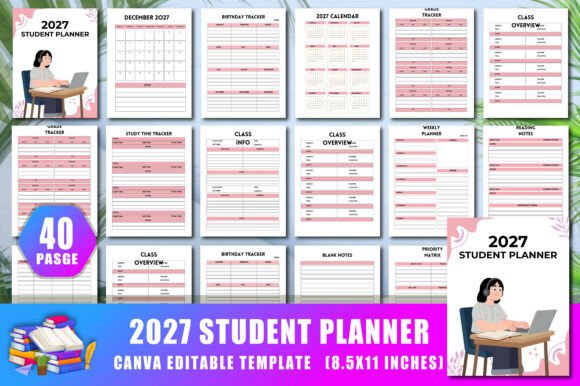
At its core, the 2027 Student Planner is a downloadable, editable interior designed for use with Canva. It includes 40 pages covering a full calendar year from January to December 2027, with features like assignment logs, grade tracking, study session planners, and project organizers. The package comes with a Canva link, allowing users to customize colors, shapes, and text before printing. The final output is a print-ready PDF at 300 DPI, sized at 8.5 x 11 inches with no bleed, making it suitable for Amazon KDP or personal use.
What distinguishes this planner from a generic notebook or a simple calendar is its student-centric layout. Instead of just date squares, you get dedicated spaces for semester overviews, homework tracking, essay planning, and group project coordination. There is also a priority matrix and a blank notes section, which add flexibility for unexpected tasks or creative brainstorming.
Comparing the 2027 Student Planner with Other Planning Approaches
When evaluating any planner, it helps to consider the spectrum of alternatives available. Understanding where the 2027 Student Planner fits on this spectrum can clarify its strengths and limitations.
Digital vs. Paper: A Hybrid Solution
Many students rely on digital calendars like Google Calendar or specialized apps such as Notion or Todoist. These tools offer real-time syncing, reminders, and the ability to integrate with other platforms. However, they also come with tradeoffs: screen fatigue, the risk of distraction from notifications, and the occasional technical glitch that can derail a carefully organized system.
The 2027 Student Planner takes a hybrid approach. Because it is editable in Canva, you can type your entries digitally before printing—or you can print it blank and write by hand. This flexibility means you are not forced to choose entirely digital or entirely paper. You can decide based on the task or your mood. For example, you might use the digital version for long-term planning and weekly overviews, then print the daily and to-do pages for on-the-go use.
Pre-Made vs. DIY: The Canva Advantage
Some students prefer to create their own planners from scratch, using a blank notebook or a digital template builder. This approach gives complete control over layout and content, but it also demands significant time and design skill. Others buy a standard planner from a store, which can be convenient but may include many pages they never use or lack the specific sections they need.
The 2027 Student Planner occupies a middle ground. It provides a pre-structured set of 40 pages covering all major student needs, but the Canva link lets you rearrange, delete, or add pages as you see fit. You can change the color scheme to match your preferences or modify the header text to fit your course names. This reduces the time investment of building from scratch while preserving the ability to customize.
Single-Year vs. Undated Planners
Undated planners offer longevity—you can start using them at any time of year and carry unused pages into the next semester. However, they require you to write in dates manually, which can be tedious and prone to error. The 2027 Student Planner is dated for the full year, which saves that step and ensures you have a clear overview of the entire academic calendar. The tradeoff is that if you do not begin using it in January 2027, some months may go unused, though you could repurpose those pages for notes or scratch paper.
Strengths of the 2027 Student Planner
Several features stand out when evaluating this planner for practical use.
Comprehensive Coverage of Student Tasks
The 40 pages are not just a calendar. They include specific sections that address the most common pain points for students: tracking multiple assignments, planning longer projects, recording grades, and logging reading. The assignment log, for instance, allows you to list tasks by class, due date, and status, which helps prevent last-minute surprises. The project planner breaks down larger tasks into smaller steps, making it easier to start early and avoid procrastination.
Print-Ready Quality for Amazon KDP
If you are a creator looking to sell planners on Amazon KDP, this product is designed with that in mind. The no-bleed format simplifies upload, and the 300 DPI resolution ensures crisp text and clean lines when printed. The inclusion of both JPG and PNG high-resolution files gives flexibility for different publishing requirements. The editable Canva link also means you can brand the planner with your own cover design or adjust it to match a series you are building.
Flexible Format for Different Learning Styles
Some students process information better visually. The planner includes a priority matrix and a study time tracker that use simple grids and checkboxes, making it easy to see what needs attention. Others prefer detailed written notes, and the blank notes pages accommodate that. This variety within one document means you are not forced into a single method of organization.
Tradeoffs and Limitations to Consider
No planner is perfect for everyone, and the 2027 Student Planner has aspects that may not suit all users.
Page Count and Binding Considerations
With 40 pages, this planner is compact. That is an advantage if you want something lightweight to carry between classes. However, it may not be enough for a student who needs space for detailed daily notes across multiple subjects. For a heavy course load, you might find yourself needing supplementary pages for certain classes. The Canva link allows you to duplicate pages before printing, so you could expand the planner yourself, but that requires additional effort.
Dated Structure May Reduce Flexibility
As mentioned, the planner is designed for the 2027 calendar year. If you are evaluating it in 2025 or 2026, you might need to wait or adapt the pages by crossing out dates. If your academic year runs from September to August rather than January to December, some pages may feel out of alignment. In that case, you could still use the monthly calendars for the months that overlap with your semester and ignore the others.
Requires Canva for Full Customization
The editable link uses Canva, a free-to-use design platform with a paid tier for some features. Most basic editing—changing text, colors, and shapes—is available in the free version, but if you want to use premium fonts or elements, you may need a Canva Pro subscription. For users who are unfamiliar with Canva, there is a learning curve, though the interface is generally intuitive for beginners.
Who Is This Planner Best Suited For?
Based on its design and features, the 2027 Student Planner aligns well with certain user profiles.
- High school and college students who have a mix of long-term projects and regular assignments will benefit from the project and assignment tracking sections.
- Students who prefer a hybrid paper-digital system can use the editable format to plan digitally and print physical copies for daily use.
- Content creators on Amazon KDP looking for a ready-to-upload planner interior with customization options will find the package convenient and time-saving.
- Students who want a focused, no-frills organizer will appreciate that the 40 pages contain only practical sections without filler.
On the other hand, this planner may not be the best fit if:
- You need a full academic year starting in August or September 2027, since the calendar begins with January. You could still use it for the spring semester, but you would need a separate system for the fall.
- You prefer a completely undated system that never expires, or you want a planner with more than 40 pages for extensive note-taking.
- You are not comfortable editing in Canva and would rather have a fully printed book delivered to your door. In that case, a printed version of this planner (if available from a seller) would be more suitable than a downloadable template.
Decision Factors: How to Choose
When comparing the 2027 Student Planner with other options, consider the following criteria:
- Time commitment: How much time are you willing to spend setting up your planner? This product requires minimal setup if you use it as-is, and moderate effort if you customize it heavily.
- Customization needs: Do you need to change page layouts, add more pages, or adjust the color scheme? The Canva link gives you control, but that control comes with a responsibility to learn the tool.
- Printing preferences: Can you easily print at home or at a local print shop? If you prefer a bound book, you may need to print and bind it yourself or use a service like Amazon KDP to produce a physical copy.
- Course load and planning style: Do you need daily pages for every subject, or will weekly and monthly overviews suffice? The 2027 Student Planner leans toward a broader overview with dedicated sections for specific tasks, rather than a daily page for each day.
- Budget: The downloadable format is generally more affordable than a physical planner, and you can print only the pages you need, reducing waste.
Realistic Examples of Use
Consider a student named Alex who is taking five courses in spring 2027, including a research-heavy history seminar and a group project in marketing. Alex uses the semester overview to map out exam dates and project milestones. The assignment log helps track weekly reading responses, while the project planner breaks the group project into phases: topic selection, research, outline, draft, and presentation. The study session log tracks hours spent preparing for midterms. When Alex needs to brainstorm essay topics, the blank notes page serves as a scratchpad.
In another scenario, a KDP creator named Jamie wants to launch a line of student planners. Jamie uses the editable Canva link to change the color palette to match a brand identity, adds a cover page, and uploads the PDF to Amazon. The no-bleed format and 300 DPI resolution meet KDP specifications without additional adjustment.
Final Thoughts
The 2027 Student Planner offers a balanced, practical option for students who want an organized academic year without building a system from scratch. Its Canva-based editability provides a level of customization that pure print planners cannot match, while the student-specific sections address real organizational needs. The key is to assess your own workflow, printing options, and comfort with digital design tools before committing. For many students and content creators, this planner represents a middle path—structured enough to save time, flexible enough to adapt.